2021. 7. 1. 02:34ㆍBig Dreamer_Developer/React
전에 말했다시피, 우리는 항상 점검할 필요가 있다. father component로 부터 전달받은 props가 우리가 예상한 props인지를 말이다. 그래서 우선 이 경우에, foodILike list의 item들 각각에 rating을 추가할건데, rating은 평가할 것이다. 설정해주는 rating은 number이다. 그게 전부인데, 나는 점점 많은 props를 나의 food object로 전달하고 싶기 때문에 이렇게 할것이다.
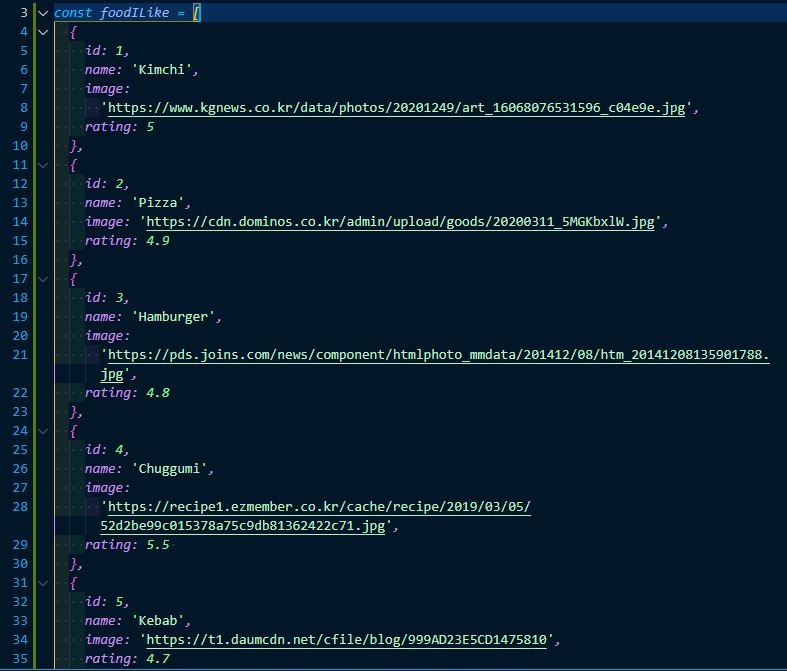
이런식으로 말이다. 또한 rating을 설정해주었기 때문에 다음과 같이 Food에도 rating을 추가해주자.
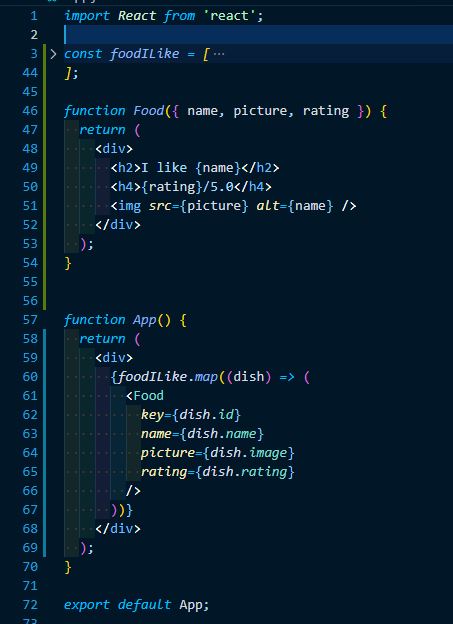
이제 우리는 더 많은 props를 전달 할 수 있다. 그리고 이제 props types라고 하는 것을 설치하려고 한다.
npm i prop-types 명령어를 터미널에 이용하여 설치할 수 있다. 이제 이 prop-types가 할 일은 내가 전달받은 props가 내가 원하는 props인지를 확인해 주는 것이다. 왜냐하면 우린 분명 종종 실수를 하고 때때로 이 food component는 다른 file에 있을 수 있거, 우리는 사람이기 때문에 picture를 보내는 대신 image를 보내는 실수를 할 수 있다. 우리에게 알려줄 무언가가 필요하다. 이봐 너 뭔가 실수했고 너의 component는 제대로 동작하지 않을거야.. 이게 우리가 필요로 하는 것이고 그것을 해주는 것이 바로 prop-types이다.
설치가 잘 되있는지 확인을 하고 싶다면 package.json에 들어가 dependencies에 prop-types가 들어가 있으면 설치가 잘 된것이다. 자 이제 prop-type를 사용해서 어떻게 체크하는지 알아보자.
우선 App.js의 맨위의 import React 라인 바로 밑에나 그 근처에
import PropTypes from "prop-types"; 를 적어준다.
그리고 Food.proptTypes = []; 을 function App위나 근처에 추가한다(위치는 정확할 필요가 없다).

자 그래서 이제 우리가 할 일은 Food.propTypes에 가서 props를 체크할 것이다.
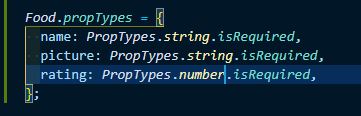
이렇게 코드를 입력해주면 끝.
좋다, 이제 우리는 많은 것은 PropTypes로 체크할 수 있다. 이런 string 또는 number같은 예제 뿐 아니라 array인지, boolean인지 true인지 false인지 object인지 있는지 없는지 체크할 수 있다. 또한 isRequired를 꼭 써줘야 하는 것은 아닌 것을 기억해주자. isRequired를 빼주면 우린 type만 체크할 수도 있고 또는 irRequired를 호출하여 type과 required를 체크할 수 있다.
기억해두자, 우리는 propTypes를 이용하여 우리가 원하는 거의 모든 걸 체크하여 사용할 수 있다.
다음 링크를 참고하자.
import PropTypes from "prop-types";

MyComponent.propTypes = {
  // You can declare that a prop is a specific JS primitive. By default, these
  // are all optional.
  optionalArray: PropTypes.array,
  optionalBool: PropTypes.bool,
  optionalFunc: PropTypes.func,
  optionalNumber: PropTypes.number,
  optionalObject: PropTypes.object,
  optionalString: PropTypes.string,
  optionalSymbol: PropTypes.symbol,

  // Anything that can be rendered: numbers, strings, elements or an array
  // (or fragment) containing these types.
  optionalNode: PropTypes.node,

  // A React element (ie. <MyComponent />).
  optionalElement: PropTypes.element,

  // A React element type (ie. MyComponent).
  optionalElementType: PropTypes.elementType,

  // You can also declare that a prop is an instance of a class. This uses
  // JS's instanceof operator.
  optionalMessage: PropTypes.instanceOf(Message),

  // You can ensure that your prop is limited to specific values by treating
  // it as an enum.
  optionalEnum: PropTypes.oneOf(['News', 'Photos']),

  // An object that could be one of many types
  optionalUnion: PropTypes.oneOfType([
    PropTypes.string,
    PropTypes.number,
    PropTypes.instanceOf(Message)
  ]),

  // An array of a certain type
  optionalArrayOf: PropTypes.arrayOf(PropTypes.number),

  // An object with property values of a certain type
  optionalObjectOf: PropTypes.objectOf(PropTypes.number),

  // You can chain any of the above with `isRequired` to make sure a warning
  // is shown if the prop isn't provided.

  // An object taking on a particular shape
  optionalObjectWithShape: PropTypes.shape({
    optionalProperty: PropTypes.string,
    requiredProperty: PropTypes.number.isRequired
  }),

  // An object with warnings on extra properties
  optionalObjectWithStrictShape: PropTypes.exact({
    optionalProperty: PropTypes.string,
    requiredProperty: PropTypes.number.isRequired
  }),

  requiredFunc: PropTypes.func.isRequired,

  // A value of any data type
  requiredAny: PropTypes.any.isRequired,

  // You can also specify a custom validator. It should return an Error
  // object if the validation fails. Don't `console.warn` or throw, as this
  // won't work inside `oneOfType`.
  customProp: function(props, propName, componentName) {
    if (!/matchme/.test(props[propName])) {
      return new Error(
        'Invalid prop `' + propName + '` supplied to' +
        ' `' + componentName + '`. Validation failed.'
      );
    }
  },

  // You can also supply a custom validator to `arrayOf` and `objectOf`.
  // It should return an Error object if the validation fails. The validator
  // will be called for each key in the array or object. The first two
  // arguments of the validator are the array or object itself, and the
  // current item's key.
  customArrayProp: PropTypes.arrayOf(function(propValue, key, componentName, location, propFullName) {
    if (!/matchme/.test(propValue[key])) {
      return new Error(
        'Invalid prop `' + propFullName + '` supplied to' +
        ' `' + componentName + '`. Validation failed.'
      );
    }
  })
};
이러한 형식으로 사용할 수 있다는 것을 잘 활용하여 react를 사용하도록 하자.
완성 코드
import React from 'react';
import PropTypes from 'prop-types';

const foodILike = [
  {
    id: 1,
    name: 'Kimchi',
    image:
      'https://www.kgnews.co.kr/data/photos/20201249/art_16068076531596_c04e9e.jpg',
    rating: 5,
  },
  {
    id: 2,
    name: 'Pizza',
    image: 'https://cdn.dominos.co.kr/admin/upload/goods/20200311_5MGKbxlW.jpg',
    rating: 4.9,
  },
  {
    id: 3,
    name: 'Hamburger',
    image:
      'https://pds.joins.com/news/component/htmlphoto_mmdata/201412/08/htm_20141208135901788.jpg',
    rating: 4.8,
  },
  {
    id: 4,
    name: 'Chuggumi',
    image:
      'https://recipe1.ezmember.co.kr/cache/recipe/2019/03/05/52d2be99c015378a75c9db81362422c71.jpg',
    rating: 3.9,
  },
  {
    id: 5,
    name: 'Kebab',
    image: 'https://t1.daumcdn.net/cfile/blog/999AD23E5CD1475810',
    rating: 4.7,
  },
  {
    id: 6,
    name: 'Kimbab',
    image:
      'https://i.pinimg.com/originals/e6/6f/34/e66f340299ef6e9a1a90b3a5c0d6cabb.png',
    rating: 4.5,
  },
];

function Food({ name, picture, rating }) {
  return (
    <div>
      <h2>I like {name}</h2>
      <h4>{rating}/5.0</h4>
      <img src={picture} alt={name} />
    </div>
  );
}

Food.propTypes = {
  name: PropTypes.string.isRequired,
  picture: PropTypes.string.isRequired,
  rating: PropTypes.number.isRequired,
};

function App() {
  return (
    <div>
      {foodILike.map((dish) => (
        <Food
          key={dish.id}
          name={dish.name}
          picture={dish.image}
          rating={dish.rating}
        />
      ))}
    </div>
  );
}

export default App;
이에 대한 연장선으로, defaultProps에 대해서 얘기를 해보자.
가끔씩은 실수로 props 를 빠트려먹을때가 있다고 했다. 혹은, 특정 상황에 props 를 일부러 비워야 할 때도 있구요. 그러한 경우에, props 의 기본값을 설정해줄 수 있는데, 그것이 바로 defaultProps 이다.
import React, { Component } from 'react';

class MyName extends Component {
  static defaultProps = {
    name: '기본이름'
  }
  render() {
    return (
      <div>
        안녕하세요! 제 이름은 <b>{this.props.name}</b> 입니다.
      </div>
    );
  }
}

export default MyName;
이렇게 하면 만약에 <MyName /> 이런식으로 name 값을 생략해버리면 "기본이름" 이 나타나게 될 것이다. 참고로, defaultProps 는 다음과 같은 형태로도 설정 할 수 있다.
import React, { Component } from 'react';

class MyName extends Component {
  render() {
    return (
      <div>
        안녕하세요! 제 이름은 <b>{this.props.name}</b> 입니다.
      </div>
    );
  }
}

MyName.defaultProps = {
  name: '기본이름'
};

export default MyName;
함수형 컴포넌트에서 defaultProps 를 설정할땐 위 방식으로 하면 된다.
'Big Dreamer_Developer > React' 카테고리의 다른 글
| All you need to know about State (0) | 2021.07.01 |
|---|---|
| Class Components and State (0) | 2021.07.01 |
| Dynamic Component Generation (0) | 2021.07.01 |
| Reusable Components with JSX + Props (0) | 2021.06.30 |
| react-dom (0) | 2021.06.29 |